Core Rules
Action dice roll
When your PC (player character) does something risky or uncertain, state how & why, and roll to find out what happens.
- Action dice: Six-sided dice (d6 notated as d)
- Threat dice: Eight-sided dice (d8 notated as t)
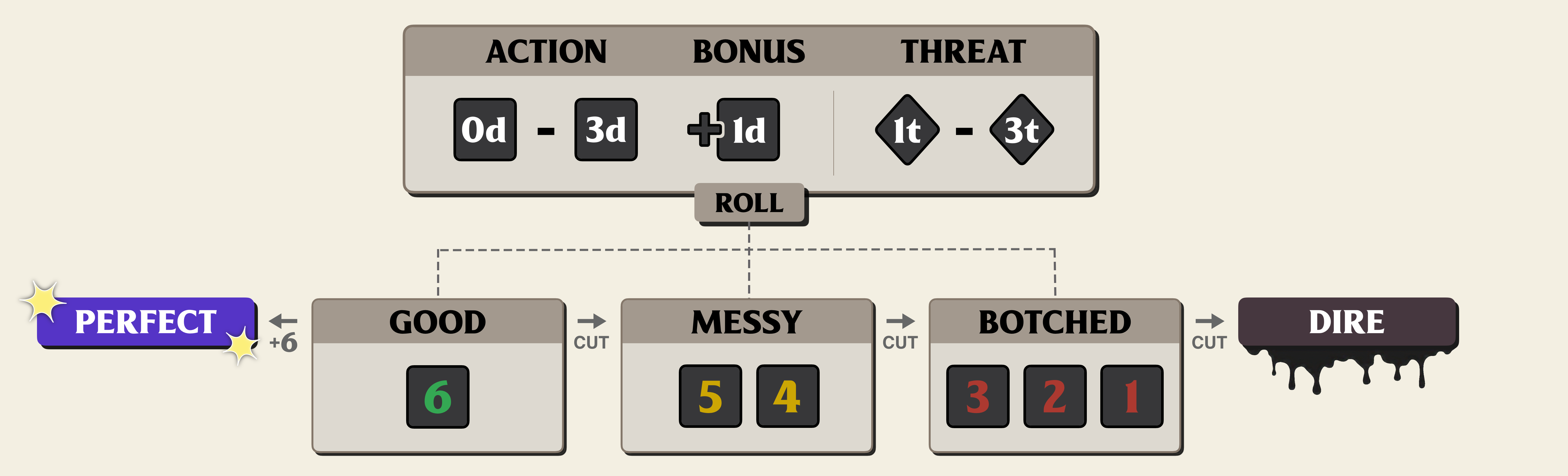
Roll a pool of action dice (d) equal to the value of your chosen Approach, add any bonuses or threat dice, and read the highest d6 to determine the result:
1, 2, 3: BOTCHED — You fail, and there are bad outcomes.
4, 5: MESSY — You do it, but not well.
6: GOOD — You do it cleanly.
Then read your outcome on the Action Chart depending on the type of action your PC is taking, usually determined by the GM.
-
A PERFECT result happens when you roll two or more 6s.
Your PC's action couldn't be better. Take the Perfect result on the Action Chart. -
A DIRE result happens when a botched result is cut by a threat die.
Things go terribly wrong. Take the Dire result on the Action Chart and face the consequences.
If an action's outcome isn't uncertain, don't roll: your PC simply accomplishes what they were trying to do.
If you would roll 0d on an action, roll 2d and take the lowest result.
Action dice represent your character's inherent capabilities.
Notation: If the GM asks for a Finesse roll with 2 threat dice and your Finesse value is 3, you roll 3d2t.
Threat Dice
The world is working against you.
0-3 d8s (t) are added to your roll by the GM to reflect a tougher than normal task.
Each 7 or 8 result on a threat die cuts (lowers) an action dice roll’s result by one step (good→messy, botched→dire).
A perfect result cannot be cut.
An action's threat level is determined when the GM adds threat dice given the difficulty of the situation.
A normal or inert but uncertain action doesn't get a threat level (+0t),
but the GM might determine the threat level as
risky (+1t), complex (+2t), or desperate (+3t).
If the action is impossible (+4t), the task can’t be accomplished— break it up into steps or try a new plan of attack.
Harm that a PC has taken also adds threat dice to a roll, but doesn't count towards making it impossible.
Threat dice represent the world pushing back on your character.
As a rule of thumb, if you have an equal number of action dice as threat dice, you have about a coin's flip chance (~50%) of getting a messy result or better.
If you have 2 more action dice than threat dice, you have a decent chance (~75%) of getting a messy result or better.
Threat Level
To determine threat level, the GM assesses:
- the position your PC is in fictionally, and
- the position of the obstacles or problems involved.
For the latter, the GM gives the position one or more Stances that represent the nature of the fictional circumstances in the world:
- Compromised — flawed, exposed, distracted — (-3t to -1t)
- Resistant — fortified, stable, prepared — (+1t to +4t)
- Volatile — chaotic, unstable, unpredictable — (+1t to +4t)
- Substantial — large, numerous, crucial — (+1t to +4t)
The GM also might give a stance of
- Inert — passive, inherent, unchanging — (+0t)
where the situation is just up to your PC's capabilities, or - Advancing — active, continual, progressing
which sets a Clock.
Both the world's position and your PC's position contribute to threat level of the situation. You can ask the GM to clarify stances and threat level before determining your PC's approach.
If you make a roll with a negative threat level, gain that many Momentum before the roll.
Momentum
Finding a way forward.
Momentum represents your PC's progress, pace, and luck.
The Momentum track on your character sheet goes from 0 to 6, and resets to 2.
Gain Momentum (+1M) whenever you gain it on Action Chart result or gain it from an ability.
Take a loss of Momentum (-1M) whenever you lose it on an Action Chart result or lose it as part of an ability.
When your momentum would hit 0, take 1 Stress and then reset the track. If you can't take any Stress, leave your Momentum at 0 until you can.
Burn Momentum after rolling to replace your highest action die result with your current momentum. Then apply any cuts from threat dice.
You can only burn momentum if it's 4 or higher.
After burning momentum, reset the track back to 2.
Bonus Action dice
You can add bonus dice to your roll from your pc's abilities, expertise, or by working together.
You can't add more than 3 bonus action dice to a roll. You can add 1 each from expertise, an ability bonus, and "working together".
If you would roll more than 6 action dice, don't roll: your PC simply accomplishes what they were trying to do.
Push yourself
Once per action, you can push yourself to do better.
- Push yourself and take 2 stress to gain +1d on your next roll.
Expertise
You can use expertise on a roll if it's relevant to an uncertain or risky action you're taking.
Add +1d if the GM agrees it's relevant.
You can't use more than one kind of expertise on a single roll.
When you use expertise on a roll, the GM might determine that there is no uncertainty or risk because of your expertise. In this case, no roll is needed.
Working Together
Assist
Help another PC on a roll. State how & why, then roll 1d and share the risk. Include your roll with theirs for the final result, then each narrate your contribution, using your own result and bonds as a guide.
When you share the risk, you open yourself up to consequences, which can prompt a GM action against you.
Outside Assistance
When an assist or setup comes from the world, like an NPC or the environment, the GM rolls 1d to represent it.
Group Effort
When more than one PCs work together, the GM chooses who rolls the action—sometimes the most skilled (lifting a boulder), sometimes the least (sneaking in). The other PCs assist.
Game flow
See an example of play, or understand the flow of the game better by learning about "Fiction first".